


Catalogues


Mitsubishi FA SoftGOT — PC and panel-PC HMI software for GOT2000-class monitoring
GT SoftGOT
GT SoftGOT
GT SoftGOT2000, GT27-SGTKEY-U
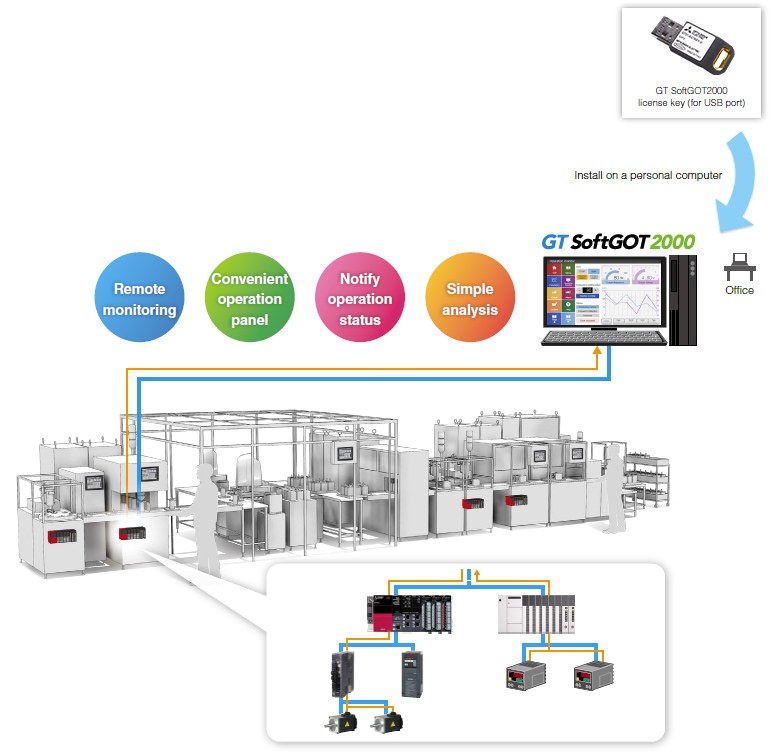
GT SoftGOT is Mitsubishi Electric’s PC and panel-PC SoftGOT HMI software for factory automation. SoftGOT2000 provides GOT2000-class monitoring and operation over the network, is included in MELSOFT GT Works3, and runs under license key GT27-SGTKEY-U (except MELIPC MI3000 with SoftGOT2000 pre-installed). Hardware GOT2000 terminals and GT Works3 package detail live on their sibling pages.

Mitsubishi Electric GT SoftGOT2000 is HMI software that runs GOT SoftGOT functions on a personal computer or panel computer so you can monitor and operate networked industrial devices. SoftGOT2000 is separate from hardware GOT2000 Graphic Operation Terminals. Confirm license, OS, and connection type with TKK.
What SoftGOT2000 is
SoftGOT2000 provides GOT2000-class monitoring and operation on a PC or panel PC. Mitsubishi FA documents functions equivalent to the GOT2000 Series for SoftGOT2000 (see the SoftGOT2000 function list for supported items). SoftGOT is software HMI — it is not a physical GOT panel and does not replace every hardware GOT install by itself.
- Monitor and operate industrial devices connected to the PC or panel PC over the network.
- Flexible resolution for office PCs, panel PCs, large displays, and ANDON-style status views (supported range per FA: 640–1920 × 480–1200 dots).
- Run Windows applications (for example spreadsheet tools) alongside SoftGOT on the same PC.
Licensing
SoftGOT2000 software is included in MELSOFT GT Works3. Runtime use on each personal computer requires USB license key GT27-SGTKEY-U. MELIPC MI3000 panel computers with SoftGOT2000 pre-installed do not require GT27-SGTKEY-U for that pre-install path. Confirm Thailand license form and key availability with TKK.
- GT27-SGTKEY-U — license key for GT SoftGOT2000 (USB-A); one key per personal computer.
- MELIPC MI3000 — SoftGOT2000 pre-install path without GT27-SGTKEY-U; hardware selection is separate from this SoftGOT package list.

Design with GT Works3
Screens for SoftGOT2000 are designed with MELSOFT GT Works3 / GT Designer3. GOT2000 project data can be converted for SoftGOT2000 use. A representative GT Works3 English site license is SW1DND-GTWK3-EC — package and version detail live on the Engineering Software page. Confirm the Thailand license form with TKK. No software pricing is listed here.
Remote monitoring and SoftGOT-GOT Link
Use SoftGOT2000 for remote shop-floor monitoring from an office PC, or as a PC/panel-PC operation panel for networked devices. SoftGOT-GOT Link lets SoftGOT2000 read project and resource data from a shop-floor GOT over Ethernet and monitor connected devices (GT27/GT25 class; separate SoftGOT screens are also possible). Confirm supported GOT models and settings with TKK or Mitsubishi FA documentation.
- Remote monitoring of shop-floor information from an office PC.
- SoftGOT-GOT Link for Ethernet-linked monitoring with a shop-floor GOT.
- Document display, recipe, and related GOT SoftGOT functions as listed by Mitsubishi FA for SoftGOT2000.

Multi-channel and Edgecross
SoftGOT2000 supports single-channel monitoring of one device channel, and multi-channel monitoring of up to four channels. Multi-channel is limited to Ethernet, OPC UA server, and microcomputer connection types. SoftGOT2000 also supports Edgecross interaction for simple visualization of edge-collected data where that platform is used. Connection types and device lists vary by single- vs multi-channel configuration — confirm with the SoftGOT2000 connectable-model list or TKK.
- Single-channel — connection types supported by SoftGOT2000.
- Multi-channel — up to four channels; Ethernet / OPC UA server / microcomputer only.
- Edgecross interaction for simple analysis and visualization where Edgecross is deployed.
Operating environment
Per the global Mitsubishi FA SoftGOT2000 Operating Environment table: Windows 11 (Home / Pro / Enterprise / Education, 64-bit) and Windows Server 2016 / 2019 / 2022 Standard (64-bit). SoftGOT2000 requires the GT27-SGTKEY-U license key on personal computers (MI3000 pre-install exception above). Hyper-V, Remote Desktop, and compatibility mode are not supported per FA. Confirm CPU, memory, and other environment notes in the FA Operating Environment table or with TKK before deployment.
Packages
In-production SoftGOT2000 packages below. Optional GOT Mobile licenses for SoftGOT2000 are listed as a footnote. Confirm Thailand orderable form with TKK.
- GT SoftGOT2000 — PC / panel-PC HMI software (included in MELSOFT GT Works3; FA download for updates).
- GT27-SGTKEY-U — license key for GT SoftGOT2000 (USB-A); one per personal computer.
Optional footnote — GOT Mobile Function License for GT SoftGOT2000: SGT2K-WEBSKEY-1 (1 license) and SGT2K-WEBSKEY-5 (5 licenses). Ask TKK whether Mobile is required for your remote-view layout.
Related products
- Hardware GOT2000 Graphic Operation Terminals
- MELSOFT GT Works3 and related engineering licenses (including SW1DND-GTWK3-EC)
SoftGOT2000 license keys and Mobile SoftGOT keys are not listed on those sibling pages.
Successor note: Mitsubishi FA also publishes GT SoftGOT3000 as SoftGOT for the GOT3000 generation (electronic licensing). SoftGOT3000 packages are not listed on this page; inquire with TKK if your project needs SoftGOT3000.
Why choose TKK for Mitsubishi Electric products?
TKK helps factory teams source, select and support Mitsubishi Electric products with confidence, from the first quotation to long after installation.
- Official Mitsubishi Electric distributor, supplying genuine products through an authorized channel.
- Competitive, value-focused pricing for single units and project quantities.
- Extensive stock ready for prompt delivery, so you can keep your lines running.
- A team of product specialists ready to advise on model selection, application and replacement.
- Dedicated, responsive after-sales service and technical support.
Contact TKK to confirm SoftGOT2000 license, OS, and connection type for your project.
Application


